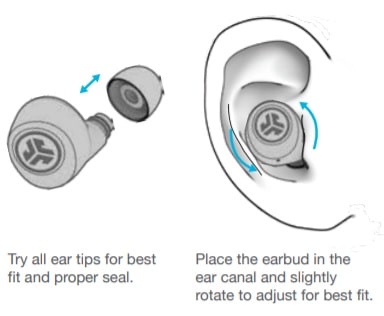
JLab Go Air Pop Manual | How to Wear? Step 1: Take both earbuds out of the charging case. Step 2: Identify the left and right earbuds. Step 3: Choose the ear tips that best suit your ears. Step 4: Insert the headphones into the inner canal of the ears. Step 5: Rotate for the best possible comfort and best fit, and make sure that the microphone is pointing to the mouth. https://www.thephonetalks.com/
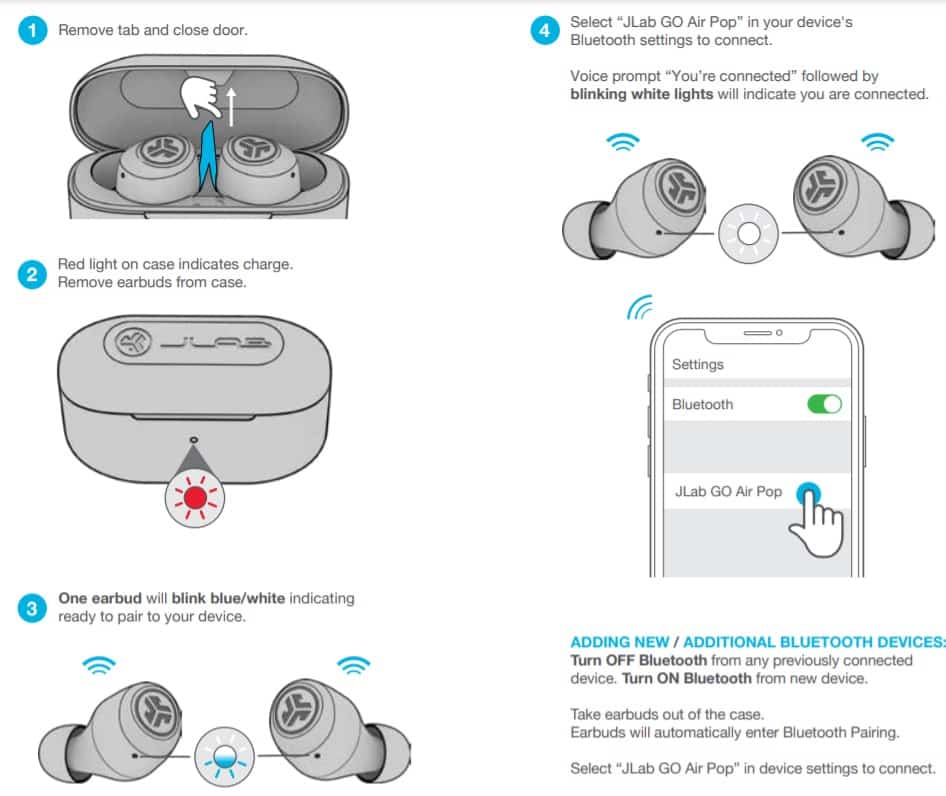
Jlab Go Air Pop Earbuds FAQs Are the JLab Go Air Pop waterproof? No, the JLab Go Air Pop are not waterproof (IPX6 and up). They have a rating of IPX4, which means they’re splash and sweat-resistant. Do the JLab Go Air Pop have a microphone? Yes, the earbuds come with integrated microphones. Do the JLab Go Air Pop have a low latency/gaming mode? No, these earbuds don’t have a low latency/gaming mode. How to know when the JLab Go Air Pop are fully charged? When the earbuds are charging, a red light is on the charging case. When fully charged, the light turns off. Can the JLab Go Air Pop connect to PC and Laptop? Yes, these earbuds can connect to PCs, laptops, and even tablets. Are the JLab Go Air Pop noise canceling? No! These earbuds don’t come with noise cancellation technology. We hope you now know how to operate the earphone from the above JLab Go Air Pop Manual...
JLab Go Air Pop Manual | How to Reset? Step 1: Place the earbuds into the charging case and keep the lid open. Step 2: Delete all “ JLab GO Air Pop ” pairing information from the connected device. Step 3: Press the multifunction touch button on one of the earbuds 7 times, until a blue light on the earbud flashes 4 times. Step 4: Press the multifunction touch button on the other earbud 7 times, until a blue light on the earbud flashes 4 times Step 5: Take both earbuds out of the charging case. After that, the resetting will be done. Credits: JLab https://www.thephonetalks.com/


Comments
Post a Comment